

HigginsPay - BNI Membership Training
Higgins AI provides best-in-class Artificial Intelligence system for small, medium and large enterprise businesses. It also provides free Public Consumer AI for searches of businesses and rebates.
HigginsPay Automates BNI Membership Application-Payment-Reference Checks




Chapter Leadership Management
To Start : Direct Applicants To Apply on the Regional Page
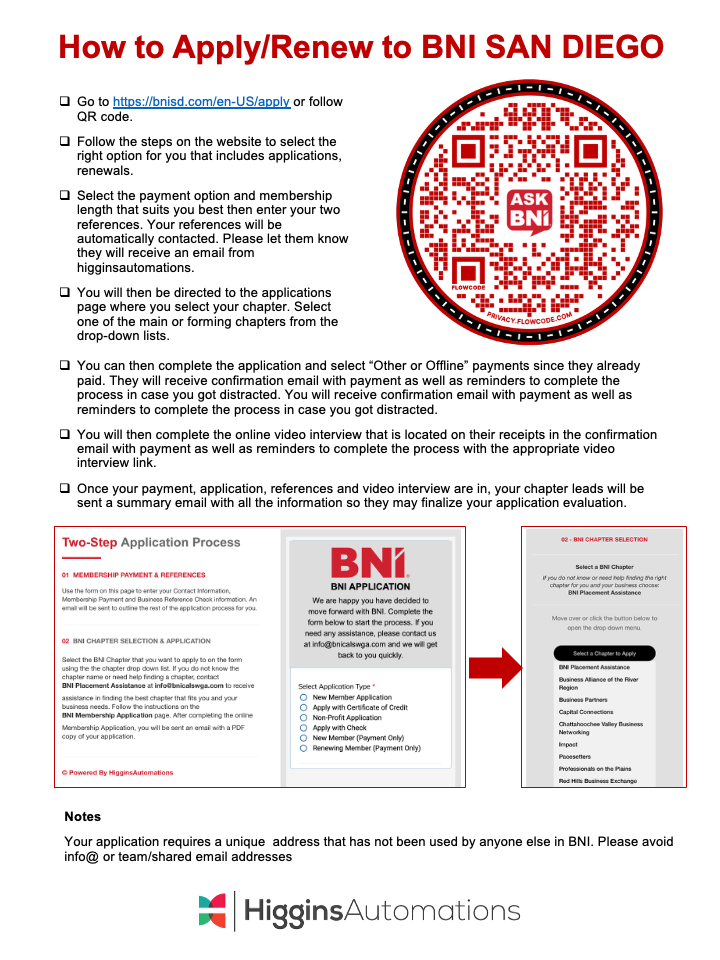
The regional webpage has an “Apply” or “Apply & Pay” menu item that all applicants can go to in order to use the automated applications process. Follow the steps on the website to select the right option for you that includes applications and renewals.
Step 1 : Applicants Can Select Payment Options
Prospective members select the payment option and membership length that suits them best then enter their two references. The references will be automatically notified to complete their reference for the applicant. They will then be directed to the chapter selection page. Select one of the main or forming chapters from the drop down lists.
Step 2 : Complete the Application and Select “Other” or “Offline” Payments
Prospective members then complete the application and select “Other or Offline” payments since they already paid. They will receive confirmation email with payment as well as reminders to complete the process in case you got distracted.
Step 3 (If Applicable) : Complete the Video Interview
In some regions, prospective members then complete the online video interview that is located on their receipts in the confirmation email with payment as well as reminders to complete the process with the appropriate video interview link. Once your payment, application, references and video interview are in, your chapter leads will be sent a summary email with all the information so they may finalize your application evaluation.
Daily Notifications for Chapter Leadership and Membership Committees
Any new update to the prospective applicant is sent to the chapter leadership and membership committee on a daily basis. It will indicate what is complete and what is missing form the application. Once all of the application elements are completed, a final notification email is provided with the application, payment, references and video interview link (if applicable).
Any questions can be sent to support@higgins.ai with a copy to the region if required.
We are available and happy to accept any requests, concerns or questions. Your email will open up a ticket that your will receive to track your request until completion. We work hard to address all requests within 24 to 72 hours.

Regional Teams Management
Step 1 : Access your Higgins Reports Page
The Higgins Reports Page provides the up to date synopsis of the membership status of applicants in the process along with their references submission. To access the Higgins Report page, simply go to your accelerated application page and click on HigginsReports. You will the need to enter a passcode provided by the region to access the data.

Step 2 : Review Application and Any Synopsis Tab
Simply click on the APP tab on the reports to view all the applications through the system in real-time. The initial column has the name and all additional columns include every field from the apply/pay form including the date of application, address, billing and options selected (in some cases, the chapter name is included).

Step 3 : Review References Tabs
The REF1 and REF2 tabs contain all of the references submitted for the applicant and are instantly updated through the system in real-time. The initial column has the applicant name and all additional columns include every field from the reference name and their answers to the BNI approved questions for references.

Step 4 : Weekly Summaries
Summaries of the region will be sent to the regional heads and any other authorized person(s) at least once a week after the applicant has applied, paid and has one reference submitted. The heads will then send that file over to chapters. in some cases, arrangements can be made to send the summaries to the chapters directly.

Important Note : New Visitors Can Be Obtained Through This Process
Carefully check the references provided to identify any who say yes to attending the inaugural event of the member. This is critical to growing the chapter using this process as the new member can get a sponsor to potentially enroll right away! This could also boost retention rates with new members as someone they know has now entered the chapter with them.
Independent Entity: Higgins.ai® is an independent provider of AI tools and training. We wish to clarify that we are not affiliated with, endorsed by, sponsored by, or otherwise associated with BNI Global, LLC (BNI®), nor any of its regional or local chapters. Our services are designed to complement, not replace, the core BNI experience.
Copyright: The information, tools, concepts, and all intellectual property contained within this document are copyrighted by Higgins.ai®. All rights reserved. No part of this material may be reproduced, distributed, or transmitted in any form or by any means, without the prior written permission of Higgins.ai®, except in the case of brief quotations embodied in critical reviews and certain other noncommercial uses permitted by copyright law.
Powered By
